

How to make an AI rap video for TikTok
Make a vertical AI rap video for TikTok from a photo. Follow a real street freestyle example, with a prompt, 9:16 settings, preview limits and download costs.
Related caseStreet freestyle
To make an AI rap video for TikTok with Rap AI Video, add a photo, describe the performance, select 9:16 and generate a 5, 10 or 15 second clip with audio. Start with a 5-second sample, purchase to generate a new full version, then upload the saved video to TikTok yourself. The full version may differ from the sample.
This walkthrough is for a short solo performance built around your photo. It follows the street freestyle case, which includes the actual reference image, prompt and generated result. You do not need to record yourself rapping.
What you can make
For a playful comeback or a fictional rap battle, use the diss track generator to shape the joke, then choose 9:16 for a vertical clip. Keep the setup and punchline short enough for one short performance of 5 to 15 seconds.
The studio generates a new performance from your image and instructions. Current output is 480p, or 720p for 10 and 15 seconds, with generated vocals and music. It does not accept a song or voice recording for precise lip-sync, and it is not a timeline editor.
- Photo: 1 JPG or PNG for a solo; 2 separate photos for a duo.
- Length: 5, 10 or 15 seconds. After the sample, 480p uses 4, 7 or 10 credits; 720p (10 or 15 seconds) uses 14 or 20.
- Frame: 9:16 for this tutorial. The studio also offers 16:9 and 1:1.
- Sample: one 5-second sample per signed-in account, free or as a low-cost Trial depending on the current offer.
- Full playback and download: require a purchase. Download within 7 days of completion.
The sample is shared across the site, including Hotel Lobby. Starting from a different example does not give you another sample.
1. Load the street freestyle example
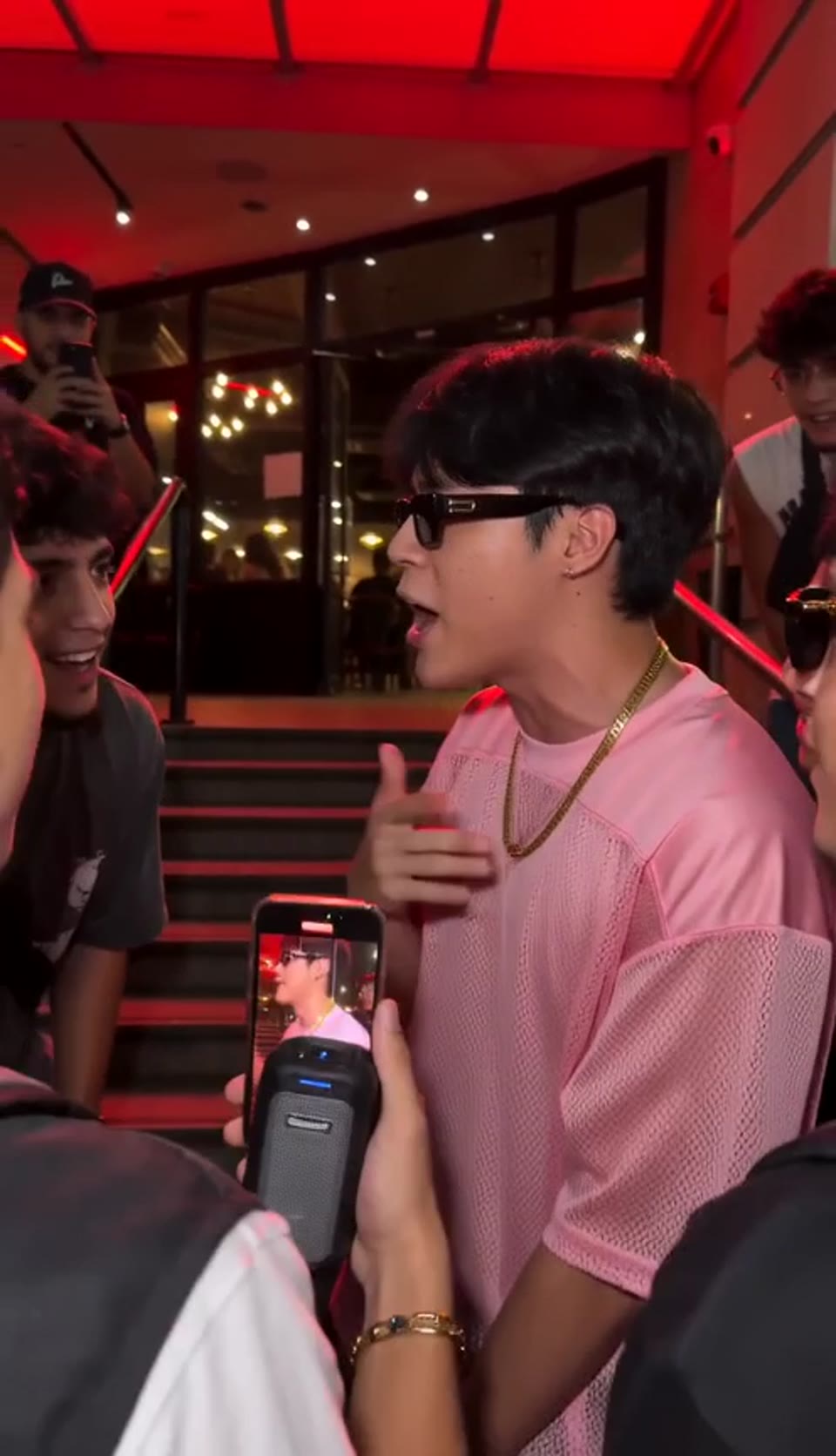
Open the street freestyle case and watch its result before generating. Select Use this prompt to load the solo setup, 9:16 frame, 15-second duration and the prompt used for that example.
The published scene places one performer outside a crowded entrance at night. Its prompt asks for original Spanish rap with dembow drums. Change those details if you want a different location, language or sound; they are creative instructions, not required settings.
The example shows one generated result. Reusing its prompt with a new photo will not reproduce every gesture, facial detail or beat.
2. Add your photo
Replace the reference with a clear photo you have permission to use. Keep the face visible and leave room around the head and shoulders. For this solo scene, use one person as the main subject.
Each file must be JPG or PNG, no larger than 10 MB. Each side must be 301–5,999 pixels, with no more than 32 million pixels in total. The image's width-to-height ratio must be greater than 0.4 and less than 2.5.
The photo's proportions and the video's frame are separate settings: you can use a square portrait to guide a 9:16 video. The image guides appearance; the prompt describes the new scene and movement.
3. Write a prompt for a vertical performance
Keep the idea readable in one short shot: one main performer, one location and a few connected gestures. Describe the framing as well as the sound, so the model has instructions for both.
Here is a shorter alternative to the published case prompt. It is a starting prompt, not the prompt used to create the example video:
Create a 15-second vertical 9:16 rap performance. Image 1 is the only lead performer; keep their face, hair and clothing consistent. Outside a small music venue at night, warm red light on the wall and soft light on the face. Start facing the camera and nodding to the beat. Add relaxed hand gestures at chest height, then a slight lean toward the lens to finish. Keep the head and hands in frame, with a few friends at the edges and nobody blocking the face. One continuous medium shot with gentle handheld movement. Original English rap vocals, deep bass and crisp drums. No existing song, artist voice, captions or watermark.
The prompt field accepts 10–1,200 characters. Change the location, lighting and language to suit your idea. Avoid packing several locations or outfit changes into the same short clip. Requests such as consistent identity or no watermark guide generation; they do not guarantee a flawless result.
4. Generate and check the preview
Confirm One performer, 9:16 and 15 seconds, then sign in and generate. Choose 10 or 5 seconds instead if you want a shorter clip. 5 seconds outputs at 480p; 10 and 15 seconds can also use 720p.
When the result is ready, check whether the face is recognizable, the subject stays in frame, and the vocals and movement fit your idea. The sample is a separate 5-second generation. The full version is generated after purchase and may have different visuals and audio.
Generation can take several minutes. If progress checking pauses, reopen the existing task before starting another. A confirmed generation failure returns the reserved credits; it is not a cash refund. See the refund policy for payment questions.
5. Unlock, download and upload to TikTok
Full playback and downloads require a one-time purchase or subscription. Starter costs US$6.99 for 10 credits in the USD catalog and does not renew. A 15-second 480p full version of your sample uses those 10 credits. Return to the studio to start it while the sample and reference photos are available within seven days. Monthly and annual options, and the currency available to you, are shown on the pricing page; confirm the checkout total before paying.
Download the unlocked result within 7 days of completion. Purchased credits have their own expiry (end of the billing period for plans, one year after purchase for Starter), separate from the video's download window.
Upload the saved file to TikTok, review the crop and audio, and add your caption. Rap AI Video does not publish to your TikTok account. For realistic generated people, voices or scenes, apply TikTok's AI-generated content label as required by its official AI content guidance.
Common questions
Can I make and download the whole video free?
No. After sign-in you can generate one 5-second sample, free or as a low-cost Trial depending on the current offer. Purchase to generate a new 10- or 15-second version from the same photos and brief. It takes additional time, and its visuals and audio may differ.
Does it make 1080p TikTok videos?
The current studio outputs 480p, or 720p for 10 and 15 seconds. Selecting 9:16 changes the frame shape, not the resolution. If your project needs a native 1080p export, this workflow does not provide one.
Can I use my own song or exact lyrics?
There is no song or voice upload. You can request lyrics, a language and a delivery style in the prompt, but exact wording and precise lip-sync are not guaranteed. The generated audio is part of the new performance.
Is the download guaranteed to have no watermark?
The sample prompt asks for no watermark or captions. That request does not guarantee that the model will avoid every text-like mark. Inspect the newly generated full version after purchase. It may differ from the sample, and this workflow does not run a separate watermark-removal edit.
Can I use two performers?
Yes. Choose Two performers and add two separate reference photos. The studio duo case is a useful starting point; switch its frame to 9:16 and ask to keep both people visible. For the general workflow, read the photo-to-rap-video tutorial.
Start with the street freestyle example, replace the photo and adapt one scene. Review the preview before deciding whether to unlock the full clip.